Material Conversion Settings
A component to convert materials for the Mobile platform. Use it when you want to convert only materials without converting the whole avatar. NDMF is required.
Materials of the GameObject with this component and its children are converted in Mobile builds.
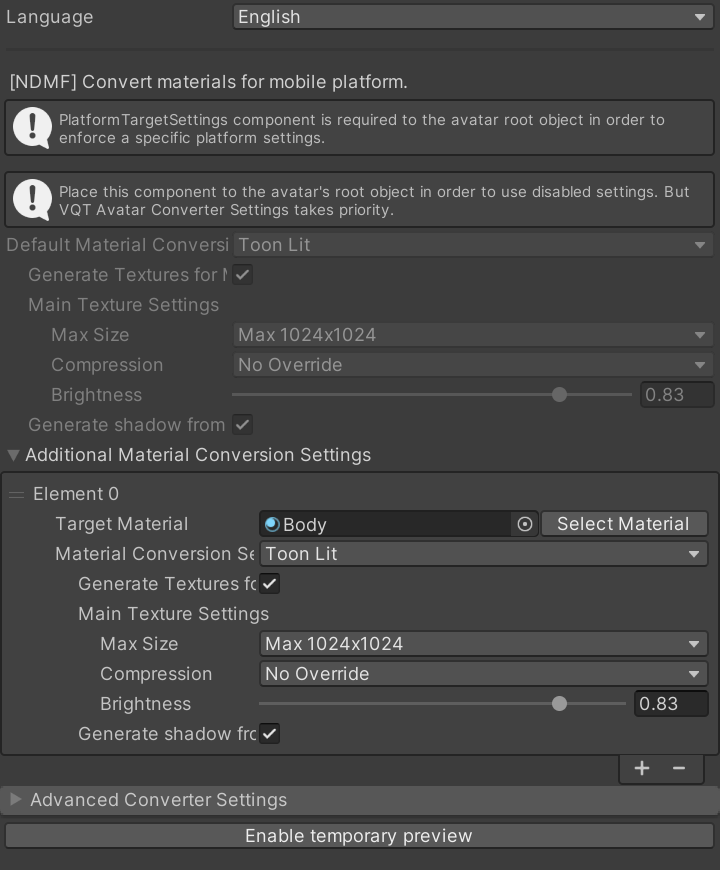
Settings
The settings are the same as the material conversion settings of VQT Avatar Converter Settings.
| Setting | Description |
|---|---|
| Default Material Conversion Settings | How to convert the materials. The default is "Toon Standard". |
| Additional Material Conversion Settings | Specifies a different conversion for specific materials. |
| Remove Extra Material Slots | Removes material slots which exceed the number of submeshes. |
| NDMF Phase to Convert | Specifies in which NDMF phase the materials are converted. Usually keep it Auto. |
| Enable Material Preview | Previews converted materials in the Scene view. |
Notes
- Some settings, such as "Remove Extra Material Slots", work only when the component is attached to the avatar's root object.
- When the avatar's root object has VQT Avatar Converter Settings, its settings take priority.