Mesh Flipper
A component which duplicates the polygons of a mesh to make it double-sided, or flips its faces. Because Mobile shaders don't render backfaces, the inside of skirts and similar parts can become invisible. When you attach this component to a GameObject with a mesh, a double-sided mesh is generated and applied at build time. NDMF is required.
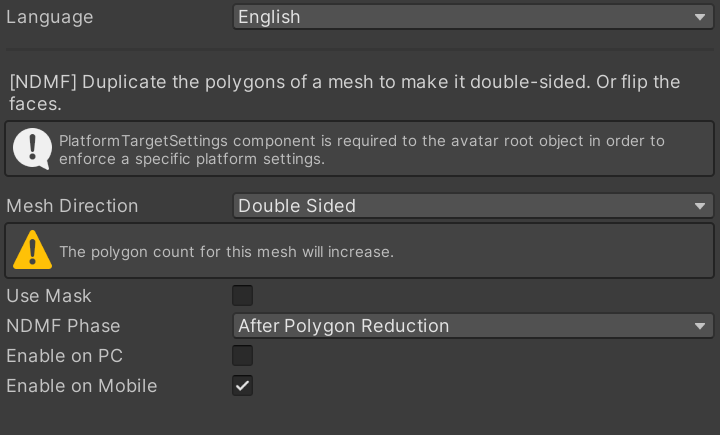
Settings
| Setting | Description |
|---|---|
| Mesh Direction | "Double Sided" duplicates the polygons to make the mesh double-sided. "Flipped" reverses the direction of the faces. |
| Enable on PC | Processes the mesh in PC builds. |
| Enable on Mobile | Processes the mesh in Mobile builds. |
| Use Mask | Limits the processed area with a mask texture. |
| Mask Texture | The texture which decides the processed area. It must be readable (Read/Write enabled). |
| Mask Mode | "Flip White" processes the white area of the mask, "Flip Black" processes the black area. |
| NDMF Phase | Selects whether to process the mesh before or after polygon reduction tools. |
Notes
- Making the mesh double-sided increases the polygon count. Watch the performance rank.
- In PC builds, the same appearance may be achieved with the shader's double-sided (Cull Off) settings instead.
- When combined with polygon reduction tools such as Avatar Optimizer, you can adjust the processing order with "NDMF Phase".